/* BeejBlog */

Trailer Hitch Bike Rack

440

After fair amount of homework, went with the Softride “Element” 4-bike rack… pricing is consistently $210’ish and I went with my local REI for solid local support.

Was torn between this Element and the $70 more big brother “Dura” model… which adds “anti-sway cradels” (i.e. seat tube rubber wraps) + built in lockup cable + hitch bolt lock + beefier + 5 lbs… I’m thinking I’ll be good at rigging my own anti sway (via old inner tubes & bungees), the rest really didn’t appeal to me and (I presume since we chose the low end 4 cyl. Kia Sportage for it’s gas mileage) I was unpleasantly surprised to discover that I have to use the 1-1/4” hitch extender - so the less weight/torque the better.

Notable feature of the Softride line is its parallelogram bars that keep the bikes perpendicular to the ground when you lean the rack away to open your lift gate... Yakima/Thule hasn't copied that yet… and the only other means for simple tail gate access out there are $600 plus “swing away” style that really look clunky to me. If this sounds useless to you, fine but I feel like it's "last inch" convenience like that which helps things slump over the swear words threshold when you just want to get something out quickly and get going.

There are a couple higher end models to be aware of if you’ve got cash to burn: a lighter aluminum one and a hydraulic Assist model that helps raise back into locked position… cool but my sweet spot is lower end.

The Softride’s are a great price against the field... one can easily hit $300, $400 , $600 for no great reason... I've read a lot about these on Amazon etc and am thoroughly prepped to be careful/creative with rubber straps that seem to be highly prone to tearing … but the metal parts and basic functionality are reported solid across the board.


Roof Cargo Box

yeah, i know, really poor iphone photo :(Installed this last night... found in local Pep Boys inventory… blasted them with a $20 coupon that expired that day :) so was out the door at $210 + tax.

This PepBoys SKU is barely a rebrand of the SportRack “Voyager XL”… the manual inside is OEM, headered with “90274 Voyager XL” and “A90275 Aero XL”… one forum I read said this bugger gets down around $100 sometimes during PepBoys promos… something to keep an eye on.

Dimensions: 35 pounds (doesn’t feel like it), 18 cubic feet (this is the max end of the range from what I could see), 62 x 39.5 x 19 inches. We have a “mountain buggy” stroller & kiddie trailer that are in the 31” width, 45” length, 15” height (when flat) range so this opens the possibility of tossing up there if we want to suffer the inconvenience – more likely for a longer trip with a nice long usage window between load and unload.

Caveat: The lid “spring lift” hinges are mostly plastic. They feel pretty fragile. I expect to break them eventually (vacation stress induced daddy hulk-out moment ).  I feel this is the primary sacrifice vs more expensive, beefier models. I look at it as a convenience for as long as it lasts and the box should still be functional after that, simply requiring manual prop open.

Note: SportRack is a Thule acquisition circa 2005.

This same basic model goes for a big range of prices under different names:

  • over $500 as the A90275 Aero XL on Amazon for no good reason.
  • Or only $280 as the SR7018 Vista XL.
  • Walmart carries it as Aero XL for $300 and $250, take your pick haha.

quick release kitIt was very straightforward to install… a few casual minutes, very doable by one person as long as you can lift it up there. The u-bolts are simple and practical… I am however hoping this $30 quick release kit will let me pop it on/off a little faster so we can garage the SUV w/o hassle… will report back on that.

[Update 2013-08-02] Ok I can now recommend the quick release kit. It’s not what I would call nirvana but it’s definitely more convenient than the stock brackets. They’re just as sturdy as stock bracket when tightened down, no concern of slippage. If you look at the picture to the right, with the metal plates numbered 1,2,3 from top to bottom – ones roof rack cross bars fit between plates 2 & 3. The “quick” part of this is that one bolt always remains connected to plate 3 and one bolt is free, creating an opening for the cross bar insertion and subsequent removal. Simply because one bolt stays connected, the hardware is always attached to the cargo box and more ready to go, unlike the stock u-bolts which must be completely separated from their nuts to remove the cargo box from the roof. Hopefully that makes sense enough to satisfy your purchase anxiety. It’s pretty obvious what has to happen when you get it in front of you.

Lastly, the one other tempting unit I saw out there in this bargain range is the X-Cargo Sport 20 currently for $180 at Sears. It wasn’t stocked locally for me at the time, and Sears’ shopping cart indicated $90 to do the oversized shipping. This unit is worthy of consideration based on size and price. 20 cubic feet is the biggest I’ve seen. 67.5 x 36.25 x 20.25 inches, same 35 lbs.

Follow-up after 3 months usage – We’ve been very satisfied with the size and performance. No recognizable wind resistance driving impacts. The rather prominent Pep Boys decal on the back face peels right off if that doesn’t fit your vanity profile :)

Mockup / Wireframe / Prototype Tools

Balsamiq “Mockups”

Pencil

Gliffy
  • free basic web functionality
  • $$ubscription model for featured version
SketchFlow is apparently coming back to VS2012 – Microsoft seems to be in a bit of a tizzy buttoning down all the loose ends in the latest transition to all things immersive.
Infragistics has Indigo Studio
There’s tons more out there… prototyping is apparently a very hot item

iTunes finally has “add to play up next”

WHY did that take till 2013?!?
Can’t believe they whacked CoverFlow in iTunes 11… I guess I’ll probably forget how much I liked the full screen CoverFlow eventually but man what a wild judgment call on Apple’s part there.
image

DST T-SQL

-- this code returns the start and end datetime’s for DST in the current year
-- DST begins at 2am on the SECOND SUNDAY of March and ends the FIRST SUNDAY of November

SELECT 
  DATEADD(HOUR, (MULTIPLIER + 7 /*skip the first week*/) * 24 /*24 hours a day*/ + 2 /*offset to 2am*/, StartWeek) AS StartDate, 
  DATEADD(HOUR, MULTIPLIER * 24 + 2, EndWeek) AS EndDate 
FROM ( 
  SELECT 0 AS MULTIPLIER, 1 AS DOW UNION ALL 
  SELECT 6, 2 UNION ALL 
  SELECT 5, 3 UNION ALL 
  SELECT 4, 4 UNION ALL 
  SELECT 3, 5 UNION ALL 
  SELECT 2, 6 UNION ALL 
  SELECT 1, 7 
) dow, 
(SELECT 
  '03/01/' + convert(varchar, DATEPART(YEAR, GETDATE())) AS StartWeek, 
  '11/01/' + convert(varchar, DATEPART(YEAR, GETDATE())) AS EndWeek 
) DST 
WHERE DATEPART(WEEKDAY, StartWeek) = DOW

Enable SSL Connections to SQL Server

“SQL Server Transport Encryption” is a good Google phrase for this technology.
Reference: http://msdn.microsoft.com/en-us/library/ms191192.aspx

Obtain an SSL Certificate

A self signed certificate is easy and works fine... here’s one way:
  • Get the IIS 6.0 Resource Kit Tools: http://www.microsoft.com/download/en/confirmation.aspx?id=17275
  • All you'll need is the "SelfSSL.exe" tool so the custom install is minimal.
  • Find SelfSSL.exe in default install path: C:\Program Files\IIS Resources
  • Good reference for SelfSSL usage: http://www.sslshopper.com/article-how-to-create-a-self-signed-certificate-in-iis-7.html, scroll down to "Generate a Self Signed Certificate with the Correct Common Name"
  • Command line example:
    1. SelfSSL /N:CN=MWR-TRO-V2 /V:1999999
    • The /V: part is the validity duration of your cert, in days. I believe 1999999 is the max, which corresponds to around 5475 years in the future (that ought'a last ya ;)
    • The /N:CN= part is the “Common Name” this cert will be tied to… in this case that needs to be the true machine name of your database server.
  • “Do you want to replace the SSL settings for site 1 (Y/N)?” => No
  • Now you have a cert registered in your “personal certificate store” - next we’ll extract it for installation on db server.
Fire up the MMC “Certificates Console” to manage your new cert

  • Good reference: http://support.microsoft.com/kb/276553)
  • Open the MMC console: Start > Run > mmc [enter] (or Windows-R) (MMC Fig.1)
  • Add the cert snapin: click File > Add/Remove Snap-in (MMC Fig.2)
  • select Certificates under Available snap-ins… and hit Add button… (MMC Fig.3)
  • select Computer Account… then Next… (MMC Fig.4)
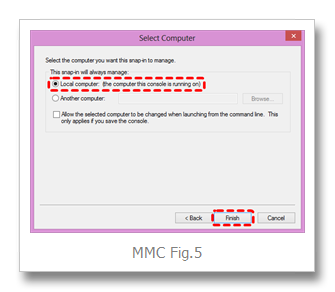
  • select Local computer, and then Finish… (MMC Fig.5)
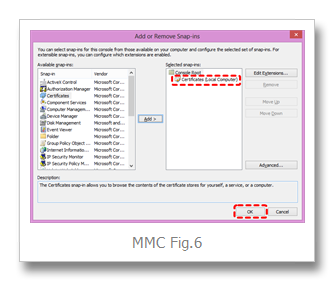
  • lastly, hit OK (MMC Fig.6)
  • You may wish to save this MMC configuration for future convenience (MMC Fig.7)
Screenshots...

Export the cert as a pfx file

…to be installed on your database server

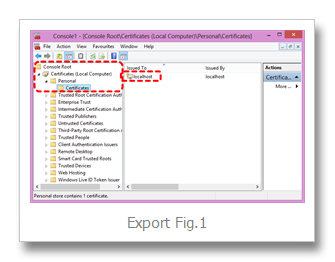
  • Certs installed via the above process will be your "Personal > Certificates" folder (Export Fig.1)
  • Right mouse desired certifcate > All Tasks > Export > Next ... (Export Fig.2)
  • “Export the private key?” => Yes … Next… (Export Fig.3)
  • Select PFX format, "Include all certs...", "Export extended", NOT “Delete…”, Next … (Export Fig.4)
  • Enter a password, hit Next… (Export Fig.5) – ** REMEMBER THAT PASSWORD **
  • Save the pfx file (Export Fig.6)
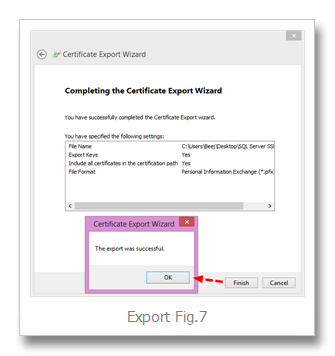
  • Finish… OK (Export Fig.7)
Screenshots...

Import cert on database server

  • Login to your DB server desktop
  • Launch MMC Cert Console same as above
  • Go to Personal > Certs
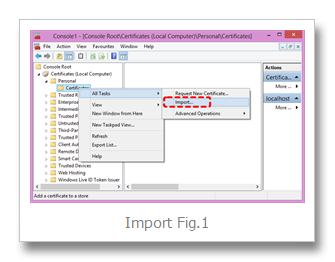
  • Right mouse All Tasks > "Import"… (Import Fig.1)
  • Next… (Import Fig.2)
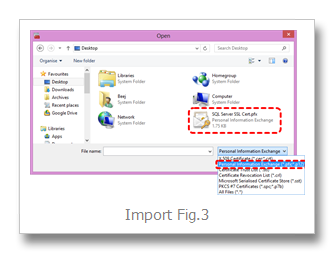
  • Browse… (Import Fig.3)
  • Next … (Import Fig.4)
  • Enter Password, select “Mark this key as exportable”, Next… (Import Fig.5)
  • “Place all certificates in the following store” => Personal… Next… (Import Fig.6)
  • Finish (Import Fig.7)
Screenshots...

Activate SSL encryption on DB server

  • Fire up SQL Server’s Network Configuration Utility
    • Start  > All Programs > Microsoft SQL Server {version} > Configuration Tools > SQL Server Configuration Manager" 
  • then under "SQL Server Network Configuration"
  • Right click "Protocols for MSSQLServer"
  • select "Properties"
  • set  "Flags tab > Force Encryption" to Yes
  • and select the installed cert on the "Certificates" tab
  • voila!
  • STOP AND RESTART THE SQL SERVER SERVICE
  • login to the instance with an SSMS Query window
  • fire this command to verify all connections are encrypted:
    1. SELECT encrypt_option, * FROM sys.dm_exec_connections WHERE session_id = @@SPID
  • Tip: SP_WHO2 is handy for obtaining spids

Recovering failed SQL Server 2012 Installation

  • I have to say, SQL Server’s setup.exe seems pretty dang fragile… I realize it’s a complicated script with endless dependencies and such, just saying… year after year I continue to run into various reasons that the setup twists it’s ankle on something, bombs out midstream and leaves behind a partial installation mess that can’t be repaired or uninstalled… maybe I’m just unlucky or perhaps I’m overly hard on poor old Windows.
  • This most recent bout was SQL Server 2012 on Windows 8… a lot of this stuff hasn’t changed all that much since SQL Server 2000… I’ve had success with most of these commands when SQL Server 2005 – 2008R2 installs have gone sour on me in the past.
  • This is primarily an exercise in mule headedness… I wouldn’t look to this as a real resolution to a production problem… I wound up with a running SQL Server and SQL Agent after an hour or so of banging but God only knows what other problems and missing chunks could still be lurking when I try to fire up other peripheral services like Service Broker, Database Mail, etc.
  • During my SS2012 install on what I thought was a fairly fresh Win8 machine, SQL Browser was the original failure… ProcessMonitor showed me that the setup script was cranky about a missing a key around here:
    • HKEY_LOCAL_MACHINE\SOFTWARE\Wow6432Node\Microsoft\Microsoft SQL Server\90\SQL Browser … note the interesting WoW subtree
  • I read a fair bit about various reg keys confusing the SQL Server installer and soon found myself unable to resist the sledgehammer urge … blowing away all reg keys and c:\program files under “Microsoft SQL Server” just feels right ;)
  • of course the next install didn’t go so hot either… next error was something about “MOF” and “WMI”… Googling yielded no silver bullets…
  • eventually realized that the main SQL Server service was actually “installed” to some degree but in a non happy state… hmmm… I’ve been here before… let’s keep throwing some wrenches at it…
  • first up, the SQL Server service wouldn’t start …
  • managed to get some help from launching SQL Server exe via command line: C:\Program Files\Microsoft SQL Server\MSSQL11.MSSQLSERVER2012\MSSQL\Binn>sqlservr.exe –sMSSQLSERVER2012
    • note that my chosen SQL Server instance name is “MSSQLSERVER2012” so you’ll need to substitute that with your own, or none at all if you are using default instance
    • was getting errors like this:
      2013-02-02 12:08:26.74 Server      Error: 17058, Severity: 16, State: 1.
      2013-02-02 12:08:26.74 Server      initerrlog: Could not open error log file ''. Operating system error = 3(The system cannot find the path specified.).
  • got sqlservr.exe to run a little further by specifying the errorlog path parm:
    • -e"C:\Program Files\Microsoft SQL Server\MSSQL11.MSSQLSERVER2012\MSSQL\LOG\ERRORLOG"
  • Next errors made me realize I needed to provide all the missing system databases by copying them
    • from: C:\Program Files\Microsoft SQL Server\MSSQL11.MSSQLSERVER2012\MSSQL\Binn\Templates
    • to: C:\Program Files\Microsoft SQL Server\MSSQL11.MSSQLSERVER2012\MSSQL\DATA
    • and specify the master.mdf/ldf via command line:
      • –m”C:\Program Files\Microsoft SQL Server\MSSQL11.MSSQLSERVER2012\MSSQL\DATA\master.mdf"
      • -l"C:\Program Files\Microsoft SQL Server\MSSQL11.MSSQLSERVER2012\MSSQL\DATA\mastlog.ldf"
  • Next errors were like this:
      2013-02-02 12:54:59.13 spid4s      Starting up database 'msdb'.
      2013-02-02 12:54:59.13 spid8s      Starting up database 'mssqlsystemresource'.
      2013-02-02 12:54:59.14 spid4s      Error: 17204, Severity: 16, State: 1.
      2013-02-02 12:54:59.14 spid4s      FCB::Open failed: Could not open file e:\sql11_main_t.obj.x86release\sql\mkmastr\databases\objfre\i386\MSDBData.mdf for file number 1.  OS error: 3(The system cannot find the path specified.).
      2013-02-02 12:54:59.14 spid4s      Error: 5120, Severity: 16, State: 101.
      2013-02-02 12:54:59.14 spid4s      Unable to open the physical file "e:\sql11_main_t.obj.x86release\sql\mkmastr\databases\objfre\i386\MSDBData.mdf". Operating system error 3: "3 (The system cannot find the path specified.)".
      2013-02-02 12:54:59.15 spid4s      Error: 17207, Severity: 16, State: 1.
      2013-02-02 12:54:59.15 spid4s      FileMgr::StartLogFiles: Operating system error 2(The system cannot find the file specified.) occurred while creating or opening file 'e:\sql11_main_t.obj.x86release\sql\mkmastr\databases\objfre\i386\MSDBLog.ldf'. Diagnose and correct the operating system error, and retry the operation.
    • I’m gathering this “e:\sql11_main_t.obj.x86release” path was where all the temporary files sat during installation… I haven’t been able to track down where that path is stored in order to set it right… for now I took the easy way out and simply created a symbolic link from that bogus path to my C:\ path and as they say, robert is your father’s brother.
  • Next problem was that the failed installation hadn’t gotten to the point of establishing any of the sysadmins logins… so couldn’t get SSMS to connect to the instance … I’ve actually run into this before… it’s not that bad to work around *IF* you can log into windows as the builtin “Administrator” account…
    • start sqlservr.exe in single user (aka maintenance mode) via: sqlservr.exe –m {plus all other parms previously mentioned}
    • enable your local Administrator account via cmd: net user administrator /active:yes
    • then login to Windows as Administrator (switch user)
    • fire up SSMS under this account and you should now be able to connect to your cranky SQL Server instance
    • add your missing sysadmin logins… e.g. sa, “BUILTIN\Administrators” and anything else you want… note: the NT account browser doesn’t display “BUILTIN\Administrators” in the list but it worked fine entered manually.
    • now you can logoff your Administrator account, switch back to your preferred login, stop sqlservr.exe via CTRL-C, start it back up in normal mode (without –m) and you should be able to connect normally
  • To get the service to start normally you could enter the –e, –d, –l parms on the service command line but I found that it is registry entries that normally provide these defaults so I went that route:
    • HKEY_LOCAL_MACHINE\SOFTWARE\Microsoft\Microsoft SQL Server\MSSQL11.MSSQLSERVER2012\MSSQLServer\Parameters
      • add string value: SQLArg0
        • -dC:\Program Files\Microsoft SQL Server\MSSQL11.MSSQLSERVER2012\MSSQL\DATA\master.mdf
      • SQLArg1 = –e{path}
      • SQLArg2 = –l{path}
  • The last annoyance laughing in my face was the SQL Agent… Service not even installed.
    • here’s the command line that wound up having the right footprint to make SSMS recognize a happy SQL Server Agent node:
      • sc create SQLAgent$MSSQLSERVER2012 binPath= "C:\Program Files\Microsoft SQL Server\MSSQL11.MSSQLSERVER2012\MSSQL\Binn\SQLAGENT.EXE -i MSSQLSERVER2012" type= own start= auto depend= netbios DisplayName= "SQL Server Agent (MSSQLSERVER2012)"
    • I think this reg key was also crucial:
      • HKEY_LOCAL_MACHINE\SOFTWARE\Microsoft\Microsoft SQL Server\MSSQL11.MSSQLSERVER2012\SQLServerAgent
        • “ErrorLogFile” (String Value) = C:\Program Files\Microsoft SQL Server\MSSQL11.MSSQLSERVER2012\MSSQL\LOG\SQLAGENT.OUT
    • everything seems to be fairly in order but I do see some evidence of a few remaining missing chunks when I browse the SQL Agent properties under SSMS… hopefully I don’t really care about those settings
    • couple other tips:
      • you can run C:\Program Files\Microsoft SQL Server\MSSQL11.MSSQLSERVER2012\MSSQL\Binn\SQLAGENT.EXE from command line to get some clues
      • -c tells it to run as a standalone exe outside of the service control manger
      • -v is verbose output and looks useful
      • -I is the SQL Server instance designation
  • One remaining annoyance is that that SQL Server Network Configuration nodes are all empty under the SQL Server Configuration Manager console… no errors, just empty… supposedly this is tied to the “Client Tools Connectivity” installation item but I’ve remove/re-installed that successfully, to no avail… would love to hear how to recover this management panel functionality.