/* BeejBlog */

ATI 5450 with Hackintosh (OSX 10.8.5)

(my X1300 post)

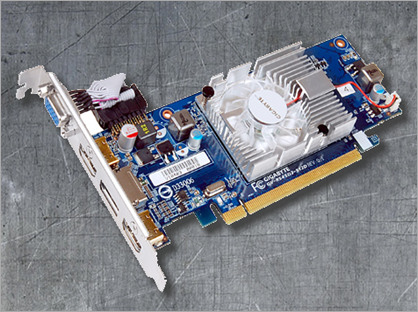
I still believe someone will get the x1300 running QE on Lion… the fact that the old 7187 DevID is still present in AT13000Controller gives me faith … if it weren’t for another motivation, I would just wait. My other motivation is that it would be nice to upgrade to 3 displays, adding a Dell 30” to the current 24” and projector. So, my criteria are: Fanless, reasonably Hackintosh compatible, 3 display support, <$100 (the x1300 was $30 :) and lastly, nothing too hot/huge … turns out, there aren’t really that many obvious options to choose from… I’ve come to understand that to go from 2 displays to 3 displays basically requires a DisplayPort capable card aka “DP” (at least in ATI land… I’m less familiar with nVidia models). Apparently DVI/HDMI/VGA all require their own clock, and contemporary consumer cards tend to be implemented with only two clocks, hence the plethora of dual display cards. DisplayPort doesn’t require a clock as it is “packet based”. There is the Sapphire “Flex” line which implements an additional clock to drive three DVI/HDMI ports, but those are dual slot and more expensive than I’m looking for. So, out of the gate, I really liked the Sapphire ATI 5670 Ultimate … it has exactly all three ports I want: DP+HDMI+DVI, it’s single slot, the cooler looks “right” and it’s the very last stage before cards require the extra power connector, perfect!… furthermore, the 5670 was stock hardware in 2010 iMac’s and there’s a 5670 listed on the 10.7 HCL requiring zero mods for full functionality… but wouldn’t you know it, this perfect card appears to be discontinued in US markets!! :( If you can find one of those buggers for <$100, I would hold on to it like gold. I was finding them for around $132 USD in Euro markets. If you go up from there, everything just gets unnecessarily big & hot for my needs… so I went down, and the next thing I ran into was the ATI 5450… There is a 5450 listed on the 10.7 HCL requiring only one simple ATI5000Injector.kext (and I’ve now confirmed for myself that this does work with full res/QE in Lion)… fanless 5450’s are prevalent… VisionTek, HIS & Sapphire have viable candidates … one slight downside is that the most ubiquitous 5450 package has VGA for the third port… so the projector has to go on VGA rather than HDMI/DVI… initially that seemed like an annoying step back into analog but I tested my projector on VGA and it was just as clear as HDMI. VisionTek’s DP capable models are the 900315 and 900320 (900320 looks to be the 900315 bundled with low profile bracket and some adapters)… The VisionTek’s are out there… best deal I found (including used) was a new 900315 direct from Amazon for $65be careful, there are tons of mislabeled non DisplayPort VisionTek 5450’s for sale… I shipped one for $47 only to find out it was HDMI rather than DisplayPort (looks like it’s actually a 900358)… The VisionTek VGA+HDMI+DVI configuration is *very* prevalent… the DP ones are harder to find… I checked with several vendors on Amazon and eBay and kept running into mislabeled HDMI models. HIS’s fanless 5450 DP is the H545H1GDL, couldn’t find any. Sapphire’s fanless 5450 DP models are 11166-00 and 11166-09, couldn’t find any of those either. So it was basically down to the VisionTek… as I said, ordered one, got the wrong model, but it does great in Lion by the way… dropped in the ATI5000Injector.kext before swapping cards and it booted right into full res/QE glory first shot… too easy. All three ports were immediately recognized in Lion. So I was about ready to bite the $65 bullet on the only solid 900315 I’ve found… then I had an idea… I noticed the coolers on the 5450 I had received and my old x1300 are basically the same… the mount holes are definitely the same… and there’s this nifty Gigabyte 5450 that I’ve had in the corner of my eye… it has a fan but it uniquely provides 2 HDMI ports in lieu of the much more prevalent single DVI configuration… that’s pretty cool because I can stay all digital with the projector on HDMI and readily adapt the other HDMI to DVI for my 24” LCD. Keep in mind, it is only 512MB DDR2 compared to 1GB DDR3 on the VisionTek’s but I’m pretty sure it’ll be fine for my needs, because my x1300 is only 256MB DDR2… This Gigabyte 5450 is readily available for $40! And this month, there is a $15 mail in rebate (ends Sep.30 2011), putting this card at $31 with shipping… you just can’t beat that. So Plan A is, well, maybe the fan will actually be quiet, perhaps with a speed limit resistor. And I’m sure you can guess that Plan B is swapping the heat spreader from my x1300. If you already have an x1300 or similar low profile cooler, it might just come in handy to slide you into this cheap Lion compatibility/upgrade path… all the other aftermarket coolers I could find are undesirably large heat pipe affairs (obviously trying to cater to a wide range of heat profiles).

And that’s basically why I blathered on about all this… for anyone else with waning feelings for their old x1300, the Gigabyte GV-R545D2-512D might just be a nice, cheap, low profile upgrade…

Update 28 March 2012 – I can definitely recommend this heat spreader swap hack with the Gigabyte GV-R545D2-512D. The fan based sink that comes with is definitely a noise generator but the fanless heat sink from the X1300 lines up perfectly. The card temps are no issue. I’ve been running it for several months couple years now. Just upgraded to Lion 10.7.3. One annoying card bug, if I drive a single screen, the display will go completely haywire after a while. Everybody on NewEgg seemed to have the same problem so it’s probably a core design issue in this model. It’s a fairly random timeframe. But driving two displays, this never happens. If you don’t have two displays (which why bother getting this card), then you can actually connect two of the outputs to the same monitor and that is enough to avoid the issue.

Update 16 Oct 2013 – Running great on OSX 10.8.5 w/o issue. Pretty sure ATI5000Injector.kext stopped working as of 10.8.4 update so I switched back to manual editing the DeviceID (0x68f9) into ATI5000Controller.kext/Contents/info.plist and AMDRadeonAccelerator.kext/Contents/info.plist.

Looks like these cards still available out there (iboyds.com = $37) but probably not for much longer given the endless march.

Framebuffer Personality Patch - Recently nailed last remaining issue on my hackintosh - screen would garble upon wake. This post worked for me … kind of hard to follow where he pulled a few of the values but below is the resulting magic cookie of hex codes that work swell with this card so you don’t really need to figure anything out.

These need to be pasted over an existing 4 port personality in ATI5000Controller.kext/Contents/MacOS/AMD5000Controller, I chose Uakari.

00040000040700000001000021030102
00080000040200000001000011020204
00080000040200000001000010000303
10000000001000000001000000100401

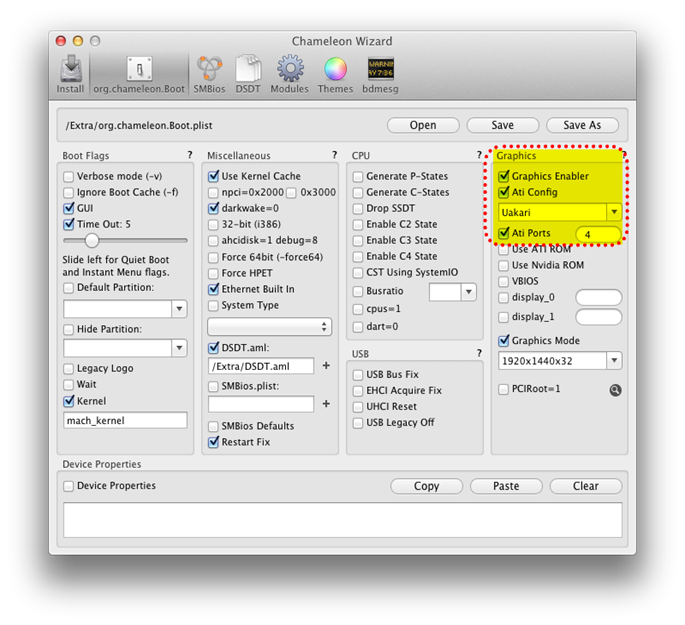
Also needed to force Uakari via /Extras/org.chameleon.Boot.plist file otherwise just blank screen upon Mac UI takeover:
Untitled

imageDSC_1698

Locating “Scrum In Five Minutes” By www.Softhouse.se

It’s not on their main downloads page anymore.

Here’s their registration page with immediate PDF download after:

http://softhouseeducation.com/material/scrum-five-minutes

Outlook Bulk Remove Encryption

PowerShell Script to scan through specified Outlook folder and remove the encryption flag on each email.

Background: We tend to cycle smart cards over the years in my environment. The old certs from those cards must be maintained in order to be able to pull up old emails sent to you which were encrypted with your old public key(s). This also makes it interesting to hand off a PST full of emails piled up as a simple knowledge base to someone else, since you really wouldn’t want to give them your certs of course.  Removing the encryption flag via the Outlook COM API turns out to be pleasantly trivial… literally just one line of code and a resave. The rest of this script is a simple UI and the optional folder recursion logic. If you don’t have a particular cert loaded, the script will output the subject of the failed message and then it’s a matter of getting that missing cert loaded on your system and retrying.

[System.Reflection.Assembly]::LoadWithPartialName("System.windows.forms") | Out-Null 
$notes = "Drill down into subfolders?`r`rThis works for Outlook 2010 at least.`rMake sure to have Outlook running.`rand manually open an encrypted email before running this script.`r(this will cache your pin# so it will apply to scripted access)" 
$recursive = [Windows.Forms.MessageBox]::Show($notes, "Process Subfolders?", "yesnocancel") 
if ($recursive -eq "Cancel") { exit } 

$outlook = new-object -com Outlook.Application 
$f = $outlook.Session.PickFolder() 
if ($f -eq $null) { exit } 

$PR_SECURITY_FLAGS = "http://schemas.microsoft.com/mapi/proptag/0x6E010003" 
$cr = [char]0x2028 
function RemoveCrypto($folder) 
{ 
  $txt.AppendText($folder.folderpath + $cr); 
  
  if ($recursive -eq "Yes") { $folder.folders | foreach-object { RemoveCrypto($_) } } 
  
  $folder.items | foreach-object { 
    $mailitem = $_ 
    try { 
      ############################################ 
      # here's the beef. too easy! 
      # thanks to this post: http://support.microsoft.com/kb/2636465 
      $mailitem.PropertyAccessor.SetProperty($PR_SECURITY_FLAGS, 0) 
      $mailitem.save() 
      ############################################ 
    } 
    catch { 
      $txt.AppendText($mailitem.subject + $cr); 
    } 
  } 
} 

# Create Window 
$form = new-object System.Windows.Forms.Form 
$form.Size = new-object System.Drawing.Size @(600,600) 
$form.topmost = $true 
$form.text = "Folder progress & messages that couldn't be decrypted" 

############################################################### 
# this is what kicks off the loop 
$form.add_shown({ RemoveCrypto($f) }) 
############################################################### 

$txt = new-object System.Windows.Forms.RichTextBox 
$txt.Dock = "Fill" 
$txt.AutoSize = "True" 
$txt.Font = new-object System.Drawing.Font("cambria", 13) 
$form.Controls.Add($txt) 

$close = New-Object System.Windows.Forms.Button 
$close.Dock = "Bottom" 
$close.AutoSize = "True" 
$close.Text = "Close" 
$close.add_click({ 
$form.Close() 
}) 
$form.Controls.Add($close) 

# Show window 
$form.showdialog() 
$form.dispose()

Exporting and Re-deploying SQL Server 2008 Maintenance Plans

Challenge: There’s lots of chatter out there about working around various issues related to pulling an SSIS package out of an initial definition server and then reinstalling it on other servers.  For example:
INSERT statement conflicted with the FOREIGN KEY constraint "FK_sysmaintplan_log_subplan_id". The conflict occurred in database "msdb", table "dbo.sysmaintplan_subplans", column 'subplan_id'.
The following scripts are my effort to bundle all the steps into something that allows me to forget about the messy details.
For me this comes in handy for managing a standardized maintenance plan on many identical database instances... e.g. a bunch of replication subscribers.
Notes:
  • Full blown BIDS/SSIS vs Maintenance Plan wizard - My needs were met by the basic Maintenance Plan facility under the “Management” node in SQL Server Management Studio (SSMS).  From what I understand, this supports a subset of the full SQL Server Integration Services (SSIS) functionality.  Therefore, there is a lot of chatter about mixing and matching the two, with care.  In my experience, once I had loaded my plan in BIDS (Business Intelligence Development Studio), attempted any modification and then tried to execute the corresponding DTSX back under Maintenance Plans, it was no longer compatible with that execution context and I simply didn’t try to decipher the errors any further.
  • I found that it’s convenient to have a “staging” server with identical SQL Server instance and database to what you care to redeploy to… therefore the maintenance plan you export is largely ready to go as-is.
  • One manual DTSX tweak that remains necessary is to delete the encrypted password node and add the password directly to the connection strings… I believe the encryption is tied to a machine based key and therefore isn’t portable but I could be wrong about that.
  • I’m using SQL Server 2008 R2.  I’m assuming everything is 2008 “R1” compatible and could very well work on SQL Server 2005 but I haven’t tried it.
Here’s some working code.
  • All these scripts depend on environment variables SQLCMDUSER & SQLCMDPASSWORD being defined
  • export_dtsx.cmd – Batch file which pulls the maintenance plan out of SQL Server to a local .DTSX file
  • upload_dtsx.ps1 – PowerShell script which uploads the specified .dtsx file to the specified server.  Most significantly, this logic handles pulling the pertinent GUID’s out of the dtsx XML which are required to create the corresponding scheduled job records.
  • create_maint_plan_job.sql – upload_dtsx.ps1 execute this script to create the SQL Agent scheduled job corresponding to the maintenance plan… the current parameters establish an every night, midnight run.  To determine representative arguments for your own preferred schedule, simply schedule a dummy job and “Generate Script” for that via SSMS.

SQL Server – [SOLVED] “Unable to initialize SSL encryption because a valid certificate could not be found, and it is not possible to create a self-signed certificate."


Nutshell solution: Generate a self-signed certificate and plug it into SQL Server Configuration Manager > SQL Server Network Configuration > Protocols for {instance_name} > Properties > Certificate > Certificate

Snap3

I read through dozens of folks wrestling with this issue and various suggested remedies (reinstalling, sysprep, etc) yet I found none addressing the certificate error directly in this way … so it seems worth getting this message out there.

Cause: For me, my SQL Server 2008 R2 (v10.50.1600.1) install went wonky (ran into some group policy brick walls) and somehow the default self-signed certificate must've gotten wiped out.

Interestingly, on other servers where the install ran without issue, this certificate entry is also blank… so that tells me we’re fortunate SQL Server is able to utilize this new one we throw in.

One straightforward way to generate self-signed certs is with "SelfSSL.exe" from the IIS 6.0 Resource Kit Tools. Here's example command line usage:
             SelfSSL /N:CN={database server name} /V:1999999

  • If you're not familiar with certs, the name must match the name of the machine exactly, or it won’t show up in SQL Server Configuration Manager’s certificate drop down list!… this name should be the “FQDN” (Fully Qualified Domain Name)… typically the “Full Computer Name” as listed under Control Panel > System.
  • The /v option is the #days the cert is valid for... through empirical study I believe 1999999 is the max allowed… that currently pushes expiration out to the year 7487, which will hopefully last ya ;)
  • SelfSSL often spews “Error opening metabase: 0x80040154” … This would probably be bad news if you wanted to use this certificate for IIS SSL but apparently it’s not a factor for SQL Server SSL.
  • One can examine the certificates that have been generated this way by launching mmc.exe, adding the Certificates snap in, selecting “Computer account” and looking at the “Personal” certificate store.

Snap1

In a blatant attempt to cast a wide net on search hits , here’s a typical log that’ll be spewed along with the aforementioned error:
2012-02-10 09:57:09.07 Server      Initializing the FallBack certificate failed with error code: 1, state: 1, error number: -2146893802.
2012-02-10 09:57:09.08 Server      Unable to initialize SSL encryption because a valid certificate could not be found, and it is not possible to create a self-signed certificate.
2012-02-10 09:57:09.08 Server      Error: 17182, Severity: 16, State: 1.
2012-02-10 09:57:09.08 Server      TDSSNIClient initialization failed with error 0x80092004, status code 0x80. Reason: Unable to initialize SSL support. Cannot find object or prope
rty.
2012-02-10 09:57:09.08 Server      Error: 17182, Severity: 16, State: 1.
2012-02-10 09:57:09.08 Server      TDSSNIClient initialization failed with error 0x80092004, status code 0x1. Reason: Initialization failed with an infrastructure error. Check for
previous errors. Cannot find object or property.
2012-02-10 09:57:09.09 Server      Error: 17826, Severity: 18, State: 3.
2012-02-10 09:57:09.09 Server      Could not start the network library because of an internal error in the network library. To determine the cause, review the errors immediately pr
eceding this one in the error log.
2012-02-10 09:57:09.09 Server      Error: 17120, Severity: 16, State: 1.
2012-02-10 09:57:09.09 Server      SQL Server could not spawn FRunCM thread. Check the SQL Server error log and the Windows event logs for information about possible related proble
ms.

Amiga – Future Tank game (Tron Font)

Latest Tron movie triggered some old brain cells since the title font is similar.

Yeah, I know, seriously stuck in the past.


clip_image002 clip_image001 clip_image001[5] clip_image001[7]