Understanding Exposure
| This is a great book by a Mr. Bryan Peterson Make sure you get the latest edition (currently Aug.2010). Bryan has a an easy going writing style packed with tons of real examples. It’s not a very long book (~175 pages) and there are lots of great example photos filling up nearly every page. It is highly rated on Amazon… only $20 with shipping. Basic takeaways for my own future reference:
For one example, starting with the desire to have full focus on a long view (e.g. big field of flowers), we select a high f/stop. If it's a bright easy light day, we can leave our ISO low … lastly we move the shutter speed up or down until our camera’s light meter falls on ZERO. I had never been clued in on that fundamental part about adjusting one or the other (aperture or shutter) in order to *move*the*light*meter* bar back to center zero. One typically does this looking through the viewfinder at the little gauge of vertical bars with 0 in the middle. This was a pretty big revelation for me. Maybe I'm particularly clueless :) and it's considered so obvious that it's not worth mentioning; but I also wonder how many people carry around multiple hundred dollar cameras without knowing this. For an alternative example, if we want to capture that “blurry water” effect on a stream or a waterfall, we’ll start with a longer shutter to (e.g. 1/8 sec or even 1 full sec) and then move the f/stop to get the light meter to 0… the f/stop will be high in this case (perhaps even f/32) because a long shutter is a long exposure to light and therefore a correspondingly small opening is necessary to counteract that light washout (i.e. overexposure). | ISBN-10: 0817439390 ISBN-13: 978-0817439392 |
YASBE – Open Source Code Incremental Backup Windows WPF Application
I’ll admit right up front, the UI is a a bit cluttered and terse… classic, good-enough-for-own-purposes-in-the-time-i-had syndrome
full source svn repoUpdate 3/24/15 - Google is shutting down code.google.com :( but provided easy migration to github: New source link.
- Basically, it just works like a champ… I really like how it came together… WPF is awesome… it all feels *very* peppy & responsive on my “aging” Quad Core 2…
- currently implemented on sql server 2008 (express)… should be relatively database agnostic in theory, but…
- The one big sql server 2008 dependency that I do use is SQL Server table-valued stored proc parameters.
- install the default database structure via .BAK file
- This SQL Server table proc parm approach is a particularly fun optimization I’ve been itching to implement to see how it hangs together in lieu of using it elsewhere (whenever I can finally get my work to upgrade to SQL Server 2008!!! :)
- Anyway, as far as the actual application goes, see screenshot, it’s WPF 4 code with a lot of little tricks I’ve learned along the way with my other much larger scope WPF LOB project at work.
- YASBE (“Yet Another Simple Backup Enabler”) immediately presents the typical checkboxed include/exclude filesystem tree where you select which folders are in and out… you can of course simply select a root drive letter if you’re organized to have everything you care about on one big data drive.
- I underestimated the complexity of rolling my own folders treeview but I like the work I achieved in the .Net IO FileSystem code & the corresponding WPF TreeView XAML here (search for “TreeView”)… I’ve seen other examples of loading a WPF TreeView (telerik knowledge base etc)… but I feel like i did mine a little tighter… easier to copy/understand I think… the tree is efficiently lazy loading… ie it only scans the next set of folders down when you expand a parent
- Then one would typically hit the “Select Next Disc's Worth Of Files” button and YASBE cranks down the list until it’s included 25GB worth of new/changed files that are candidates for going to a Blu-ray disk.
- the .Net DirectoryInfo.GetFiles() appears to be adequately performant on my average desktop hardware … it scans my 200GB+ of photos and other important documents in <16 seconds… actually it scans all those files, –AND- uploads it to sql server (via table stored proc parameter) and does the comparison to all the previously recorded date stamps to determine what is new/changed… –AND- sends that recordset back to the client and displays it on a datagrid, all that in 16 seconds… I’m absolutely pleased with that… I feel that the master blast of all those file records up to SQL Server using the table valued stored proc parm really nicely optimizes that step.
- Then one would hit “copy to staging folder”… wait quite a bit longer to copy 25 GB to your Blu-ray’s staging folder (actually it’s effectively more around 23GB max from what I’ve read)
- Then I highly recommend you burn your Blu-ray by drag/dropping your burn staging folder into Nero BurnLite (which is free)
- Nero BurnLite has been 100% reliable for me and it’s a perfectly bare bones data disc burning software, exactly what I want, without any other fluff.
- I had *major* reliability problems with Windows 7's built-in disc burning facility!!!… I coastered 5 out of 6 tries before I bailed and went to Nero… it becomes mentally painful trial and error at 25GB a pop for a cheap arse like me :)… Yet Win7 seems absolutely fine for DVD/CD burning… I’ve burned those successfully w/o a glitch.
- Here’s the interesting anecdotal evidence, after the burn, Nero spews out a list of mandatory renames for files that somehow wouldn’t fit the disc’s file system… which is UDF I believe… I’m wondering if Win7 doesn’t perform that kind of necessary bulletproofing and that’s why the burns would always fail several minutes in, after wildly jumping around between random %complete estimates and a schizophrenic progress bar.
- Nero methodically clicks off percent-completes nice & fast … seems like 25GB only takes about 15mins… very doable… I did 8 x 25GB discs to cover my whole photo library while working on other things and it went by like clockwork.
Our 4-Hour Body Recipe
Ferris gets right to his go-to Mexican oriented mix pretty quick into the fat loss section of the book… it’s very quick reading to pick up his basic approach. Here’s how we’ve taken that and made it our own:
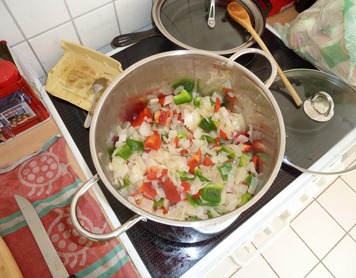
- Full Size White Onion chopped up (probably any kind of onion will do)
- Full Size Tomato chopped up
- Full Green or Red Bell Pepper chopped up
- Can of Black Beans (pinto and kidney work as well of course… we just really like black beans)
- Grilled Large Chicken Breast
Those items are all basically on a 1:1 ratio. *5* of each fills our 6 quart “stock pot”, which will last the two of us through a work week. Along with those primary stock items, we also flavor in some diced garlic… I love garlic, I go kind of nuts with it.
To spice it up, I do a full 16 oz. jar of Vlasic *hot* pepper rings (what I call pepperoncini's) -AND- a full 12 oz. jar of sliced hot jalapenos… including the juice from both (keep an eye out for corn syrup here)… those give it a fun kick… which should also help manage appetite. I think you’d want the full 5x of everything else to take on those full jars of spiciness… please start out with less until you find your preferred balance.
To help freshen up each reheated serving, we melt in some grated cheese (keep it very minimal since this is on the avoid list), then toss on a dollop of sour cream and some avocado slices.
Tim gives pointers on what to avoid just as much as what to embrace… pretty much all fruit sugars are on the avoid list, no big surprise. Another is to avoid many things that are white due to flour or starch, which is also a fairly common thread of advice from other dietary sources.
It’s nice to load up the digital version of the book and hit the hyperlinks to the references… the weight tracking spreadsheet, etc.
Good luck with your goals and have fun! :)
HighPoint RocketRAID 620 indeed works for Hackintosh
Please see here for background on the “main PC = NAS” approach this hardware facilitates.
And here for my other Hackintosh tribulations with getting my old graphics card to work.
I’m very satisfied for a $60 part… the drivers loaded right up under both Win7 and OS X v10.6.6 (and 10.7 currently)
As a side note: This all works well in tandem with Parallels Desktop v6’s Boot Camp virtualization facility where I can dual boot into my one sole Windows 7 install *natively* or via a Parallels VM under OS X (I know VMware has something identical but from what I’ve read, Parallels still has the edge on performance).
The drivers on the install disc were up to date… and I’m taking it as a good sign that they haven’t found need to update them for over a year now.
Windows 7 Driver – currently: v1.1.9.1221, 12/21/2009
OS X Driver – currently: v1.1.0, 12/22/2009
There is the usual BIOS based boot time configuration screen you can pop into to manage your arrays.
And you can also install a management “Web GUI” … this is obviously driven by a mini web server that runs under your OS on a certain port… this is *NOT* plugging an ethernet cable into the RAID card itself… it is not that sophisticated… the whole thing is very bare bones, very old school but seems to have the basics covered (time will tell)… it’s loaded via an old Installshield style setup.exe that I recognize from the early 90’s … the web screens themselves are completely boring old school stuff which stands out in a bad way these days but truly, <ValleyGirlMode> whatevers </ValleyGirlMode>.
looking at the benchmark from CrystalDiskMark… those sequentials look respectable but I guess the other rates are pretty poor???
those specs are running the RocketRAID on these drives: Hitachi Deskstar HD32000 IDK /7K (2TB 7200 RPM 32MB Cache SATA 3.0Gb/s 3.5" Internal)
The card itself is very miniscule… about 2.75" inches square (see below)… it is a “1 lane” card (i.e. “X1” in the PCI-express common parlance)… but it is PCIe 2.0 so you absolutely want to put it in a 2.0 capable slot if you can and on my mobo that is a x16 lane slot… which “looks” like a waste but is totally fine for me because I’m not a gamer so I’m not using that secondary PCIe x16 slot for an SLI gfx card or anything useful anyway.
Checkout this last photo… I realized the RocketRAID card’s bracket alignment was off quite a bit (too short)… after installing, the card would slide itself loose of the slot… so much so that the mobo’s electric disconnect warning light for that slot came on… the bracket for my graphics card right next door doesn’t exhibit anything close to this height deficit so I’ve got to assume the RocketRAID is a bit out of spec… after scratching my head for a minute, the obvious solution that presented itself was to move the bracket *under* my case’s card stability rail... it seems like my Antec Skeleton’s card rail particularly lends itself to this approach… I wonder if a normal case’s bracket screw down area would ?
Reclaiming disk space from “system volume information”
Don’t forget to run the VSSAdmin commands under a 64bit CMD.exe if you’re on 64bit Windows.
I know that sounds obvious but I run something called TakeCommand Console LE which is a great shell but the free version is 32bit only.
Visual Studio 2010 Slow Startup [resolved]
Apparently the culprit of my slowdown was the VMware debugger integration… resolution here
I merely uninstalled the VMDebugger component via VMware Desktop setup.exe … I did *not* have to completely uninstall all of VMware Desktop to see an significant improvement to Visual Studio startup time… down to a few seconds now from something that felt like 30 seconds.
