/* BeejBlog */

Nifty 'WhatIsMyIP' Script - put current WAN IP on Clipboard

Pre-req's:

  • 4NT - love love love that little bugger… but i guess PowerShell is probably the new cool kid in town for this kind of stuff 
    • ‘echos’ command in 4NT outputs test w/o a linefeed... so I can tack something else I wanted onto the URL… obviously the sky is your limit (can’t find the equivalent in PowerShell yet??)
  • curl - everybody's favorite web mashup tool

echos http:// >clip:
curl -s "
http://whatismyip.org" >>clip:
echos /training >>clip:

Cisco VPN and "Split Tunneling"

And that's all I have to say on this matter ;)

Awesome, CAD for LEGOs!

ok i know it's been around for ages apparently... but man that's awesome

anybody do a hard drive cage in the "technic" rivit oriented pieces yet? :)

highlights:

  • it actually "knows" when you put two technic "i-beams" together on a rivet pivot point... it'll rotate them in 3D so you can line things up with true geometry!
  • it adds up the whole parts list and gives you a total price to physically manifest your creation <nifty>
  • people can & are publishing their custom designs
  • it copies multi-part "bundles" and flips/rotates them easily to construct symmetric objects quickly
Get Started

Flash Drives Go eSATA!

Example #1: “PhotoFast G-Monster”

  • 170MB/s READS!!, 100MB/s writes
  • 32   /  64     / 128GB!!
  • $?? / $249 / $449 (28 Aug 2009)

Example #2: "OCZ Throttle"

  • comes in 8/16/32GB models, street (28 Aug 2009) ~= $40 / $55 / $92: ProVantage Link
  • Good review at Xtreme CPU forum
  • 90MB/s reads, ~30MB/s writes
  • fyi, USB2.0 spec tops out at about 40MB/s theoretical top end...  the fastest USB flash drives get somewhere around 35MB/s reads and 20 MB/s writes
  • this has dual eSATA and USB2.0 interfaces (of course)
  • and this drive still does very well over USB2.0 interface... 33MB/s read, 21MB/s writes
  • remember, SATA1 = 150MB/s, eSATA=SATA II=300MB/s theorectical top end
  • it'll actually draw power from eSATA if you're lucky enough to have that fancy of an eSATA port but those are rare so most will wind up attaching an annoying mini-usb cable for power
  • supposedly even more bootable than USB since eSATA is a "real" hard drive link
  • not very sexy casing is it? :\

IMG_1321.JPG

Volume Shadow Copy Service is Pretty Cool

(at least in Windows 2008)

More specifically the "Previous Versions" functionality that leverages this service.

To cut to the chase, I didn't realize that you could browse into whole folders worth of snapshots... screenshot below says it all...

Notice that there's a funky "\\localhost\drive$\@GMT..." syntax for getting at the old version of that folder... in this case I shadowed the entire drive starting at the root level.

After Googling around a little more on this I'm starting to think us Winblows users shouldn't be quite so OSX TimeWarp jealous and that VSS although not as sexy, is perhaps even more robust.

In case you have no idea what I'm talking about this is a built in file level "snapshot" feature at the OS level... we get to recover the previous version of any file that's been snapshot this way... I'm not sure yet but I think one might be able to turn it on so that a snapshot automatically occurs whenever you modify a file.
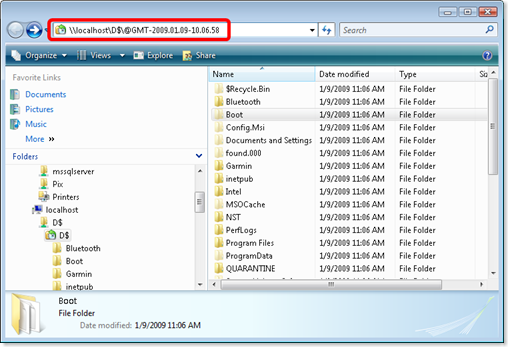
image

It's kinda tucked away ... you have to manually go and turn it on under the Properties of your drive letters:

image

Here we can create snapshots manually of course.

And you'll want to check out the snapshot schedule under Settings button which defaults to weekly... might wanna make that more often ;)

One quickly realizes the best strategy is not to simply blindly shadow your whole drive but to define a frequent schedule on your documents and development type folders ... pick and choose like that depending on the specific content.

The help is quick to point out its something to be used in tandem with normal backups and is not a replacement.

(Fairly) Quick & Painless Streaming of Your Local Audio

Here's the basic pieces I plugged together:

  • MediaMonkey is my preferred mp3 player: www.MediaMonkey.com
    1. MediaMonkey supports WinAmp API plugins which provides an excellent pool to draw nifty add-ons from
  • EdCast (formerly "OddCast") comes in various implementations, one of which is a WinAmp plugin that sends your current song to a ShoutCast (or IceCast) server: http://www.oddsock.org/tools/edcast/
    1. I chose the EdCast plugin versus ShoutCast's own plugin because EdCast got the song name and artist to come through Media Monkey and ShoutCast's plugin has a known issue that this feature only works with WinAmp
  • ShoutCast DNAS (Distributed Network Audio Server) - streams the audio out to clients: http://www.shoutcast.com/download-files

Install/configure/run:

  • Drop the EdCast plugin into Program Files\MediaMonkey\Plugins
  • Fire up your Monkey and get some tunes rolling
  • Then in Monkey > Tools > Options > Player > DSP Plugins > edcast DSP...
    1. Click on the meter in the middle of the dialog to turn on the broadcast
    2. Hit "Add Encoder" and then right click the entry to configure for MP3 and localhost, change password to what you want
    3. Personalize your stream on the YP Settings
  • Now install the ShoutCast server and fire that up
  • Cruise through the config file via the menu option in that GUI... it's very self explanatory and all the defaults are good... probably just have to make sure you get the password lined up with what you put in the plugin config
  • Then just browse to http://yourserveraddress:8000/listen.pls from another machine and it'll fire up your local media player (if you've got .pls associated of course)
  • There's some interesting stuff kicked out as a default web page if you browse to http://yourserveraddress:8000... including an admin page where you can monitor listeners, etc.
  • The default DNAS config automatically publishes you to the global ShoutCast directory (so you might want to watch your intake from that vector victor :)
  • PS- The main reason I did this was so I could listen to my tunez at work w/minimal effort :)

The Origin of VirguleStar.com

I’m drafting off the idea of expanding geeky punctuation into words (popularized by www.SlashDot.org)
(Funny story behind his originating motivation)
so SlashDot equals /.

Based on that, being a comment happy developer, I thought an expansion of /* would be particularly apropos as that’s the well known opening comment syntax in languages like C, C++, C#, Java, T-SQL, etc.

Of course, SlashStar.com and readily desirable derivates were already taken :( … however, browsing for slash synonyms turned up "virgule", specifically for the forward slash character, nice!... yeah ok, it doesn't role off the tongue but its obscurity meant I had an available domain name hit and that’s obviously key! :)

And thus www.VirguleStar.com was born.